Zero-Downtime Migration from Cluster Autoscaler to Karpenter
We migrated a fleet of production EKS clusters — some with hundreds of nodes and thousands of workloads — from Cluster Autoscaler to Karpenter with zero application downtime. This post details the CronJob-driven, IaC-integrated approach we built: cordoning old nodes and letting natural workload churn migrate pods safely, with built-in rollback at every stage.
Background: CAS and Karpenter
The Challenge
The Official Migration Guide
- Deploy Karpenter alongside your existing cluster with a default NodePool
- Set node affinity so Karpenter itself runs on CAS-managed nodes
- Scale CAS to zero replicas:
kubectl scale deploy/cluster-autoscaler --replicas=0 - Shrink ASG desired counts to force nodes out:
aws eks update-nodegroup-config --scaling-config "minSize=2,maxSize=2,desiredSize=2" - Watch Karpenter logs and verify new nodes appear as old ones are removed
- Rollback. The guide doesn't describe a rollback path. Once CAS is at zero replicas and ASGs are shrunk, reversing course means manually scaling everything back up.
- Safety net during migration. Stopping CAS removes the autoscaler before the migration is complete. If Karpenter hits a capacity issue, there is nothing to fall back on.
- Automation. The guide recommends scaling down "a few instances at a time" and watching carefully. For a fleet of clusters, this requires significant manual effort.
- Non-disruptive migration. Shrinking ASGs terminates EC2 instances directly — workloads are evicted, and Pod Disruption Budgets (PDBs) are the only protection. The guide itself notes: "If your workloads do not have pod disruption budgets set, the following command will cause workloads to be unavailable."
- Hands-off — change a config value, merge the PR, CI does the rest
- Observable — clear signal on progress at any point
- Reversible — hands-off, non-disruptive rollback
eks.amazonaws.com/nodegroup label to identify CAS-managed nodes, EC2NodeClass as the Karpenter cloud provider CRD). The pattern itself — cordon, label, wait for churn, restart stragglers, rollback via uncordon — is portable to any Kubernetes cluster with any node autoscaler. The node selector label should be replaced with whatever the autoscaler uses to tag its nodes.The Approach: Cordon and Wait
concurrencyPolicy: Forbid and a Lease serialize runs; a reviewed allowlist excludes unsupported workload types; and ready capacity, pending pods, rollout status, and application health must remain inside cluster-specific gates. The excerpts below show the migration logic, not the complete safety implementation.Migration Modes
graph LR
    A[cas-only] --> B[disabled]
    B --> C[rollout]
    C --> D[done]
    C --> E[rollback]
    E --> B
| Mode | Karpenter Limits | CAS | CAS Nodes |
|---|---|---|---|
cas-only | N/A (not deployed) | Enabled | Normal |
disabled | Bounded validation capacity | Enabled | Normal |
rollout | Full (from config) | Enabled but capped | Cordoned |
rollback | Bounded during handback | Enabled | Uncordoned |
done | Full (from config) | Removed | N/A |
disableddeploys Karpenter with bounded validation capacity (32 CPU, 256Gi) while CAS remains primary. Scheduling constraints keep ordinary workloads away while NodePools and EC2NodeClasses are validated.rolloutlowers CAS--max-nodes-totalto an environment-specific global ceiling, leaving controlled fallback capacity while Karpenter takes over.doneremoves all CAS resources (NodeGroups, autoscaler deployment, IAM roles) automatically through IaC.
The CronJob: Rollout Script
1. Pre-flight Checks
# Controller pods running?
kubectl get pods -n karpenter -l app.kubernetes.io/name=karpenter

# All NodePools ready?
kubectl get nodepools -o jsonpath='{range .items[*]}{.metadata.name}={.status.conditions[?(@.type=="Ready")].status} {end}'

# All EC2NodeClasses ready?
kubectl get ec2nodeclasses -o jsonpath='{range .items[*]}{.metadata.name}={.status.conditions[?(@.type=="Ready")].status} {end}'
2. Cordon CAS Nodes
LABEL_KEY="example.com/cordoned-by"
LABEL_VALUE="karpenter-migration"

for node in $(kubectl get nodes -l 'eks.amazonaws.com/nodegroup' \
  --field-selector spec.unschedulable!=true -o jsonpath='{.items[*].metadata.name}'); do
  kubectl label node "$node" "$LABEL_KEY=$LABEL_VALUE" --overwrite
  kubectl cordon "$node"
done
3. Restart One Workload (After Delay)
- StatefulSet with RollingUpdate →
kubectl rollout restart, where its update strategy and availability checks permit it - StatefulSet with OnDelete → excluded from the unattended path and handled by an approved runbook
- Deployment →
kubectl rollout restart(via the pod's ReplicaSet owner), where its update strategy and availability checks permit it
kubectl command—as the acceptance signal.The CronJob: Rollback Script
# Uncordon nodes we cordoned
for node in $(kubectl get nodes -l "eks.amazonaws.com/nodegroup,$MIGRATION_LABEL" \
  --field-selector spec.unschedulable=true -o jsonpath='{.items[*].metadata.name}'); do
  kubectl uncordon "$node"
  kubectl label node "$node" "$LABEL_KEY-"
done

# Retire one Karpenter node after CAS capacity and health are verified
nc=$(kubectl get nodeclaims -o jsonpath='{.items[0].metadata.name}')
if [ -n "$nc" ]; then
  kubectl delete nodeclaim "$nc" --wait=false
fi
IaC Integration
NodePool Limits Change Per Mode
disabled / rollback → { cpu: "32", memory: "256Gi" }    # bounded validation/handback capacity
rollout / done      → limits from config                # Karpenter is primary
disabled mode for validation without becoming the primary autoscaler. Scheduling constraints isolate that bounded capacity from ordinary workloads. When the team is ready, switching to rollout begins the migration.CAS Gets Capped During Rollout
rollout, the Cluster Autoscaler's --max-nodes-total is reduced to an environment-specific global ceiling. The flag caps the total number of autoscaled nodes across all node groups, so CAS can still scale while below the ceiling. We choose a value that preserves system and rollback capacity while keeping Karpenter primary.done Mode Removes CAS Entirely
done causes IaC to:- Skip creating EKS Managed NodeGroups and Launch Templates
- Skip deploying the Cluster Autoscaler Helm chart
- Skip creating CAS IAM roles
- Skip creating the migration CronJob
Monitoring
- Node counts — CAS nodes should trend to zero, Karpenter nodes should grow:
echo "CAS: $(kubectl get nodes -l eks.amazonaws.com/nodegroup --no-headers | wc -l)"
echo "Karpenter: $(kubectl get nodes -l karpenter.sh/nodepool --no-headers | wc -l)"
- Pod placement — find non-DaemonSet pods still on CAS nodes:
CAS_NODES=$(kubectl get nodes -l eks.amazonaws.com/nodegroup \
  -o jsonpath='{.items[*].metadata.name}' | tr ' ' '|')
kubectl get pods -A -o json | jq -r --arg nodes "$CAS_NODES" \
  '.items[] | select(.spec.nodeName | test($nodes)) |
   select(.metadata.ownerReferences[0].kind != "DaemonSet") |
   "\(.metadata.namespace)/\(.metadata.name)"'
# Pods on CAS nodes
count(
  kube_pod_info
  * on(pod, namespace) group_left() (max by(pod, namespace) (kube_pod_owner{owner_kind!="DaemonSet"}))
  * on(node) group_left() (kube_node_labels{label_eks_amazonaws_com_nodegroup!=""})
) or vector(0)

# Pods on Karpenter nodes
count(
  kube_pod_info
  * on(pod, namespace) group_left() (max by(pod, namespace) (kube_pod_owner{owner_kind!="DaemonSet"}))
  * on(node) group_left() (kube_node_labels{label_karpenter_sh_nodepool!=""})
) or vector(0)
# CAS nodes
count(kube_node_labels{label_eks_amazonaws_com_nodegroup!=""}) or vector(0)

# Karpenter nodes
count(kube_node_labels{label_karpenter_sh_nodepool!=""}) or vector(0)
kube-state-metrics labels: EKS managed nodegroups get eks.amazonaws.com/nodegroup, Karpenter nodes get karpenter.sh/nodepool.Real-World Results
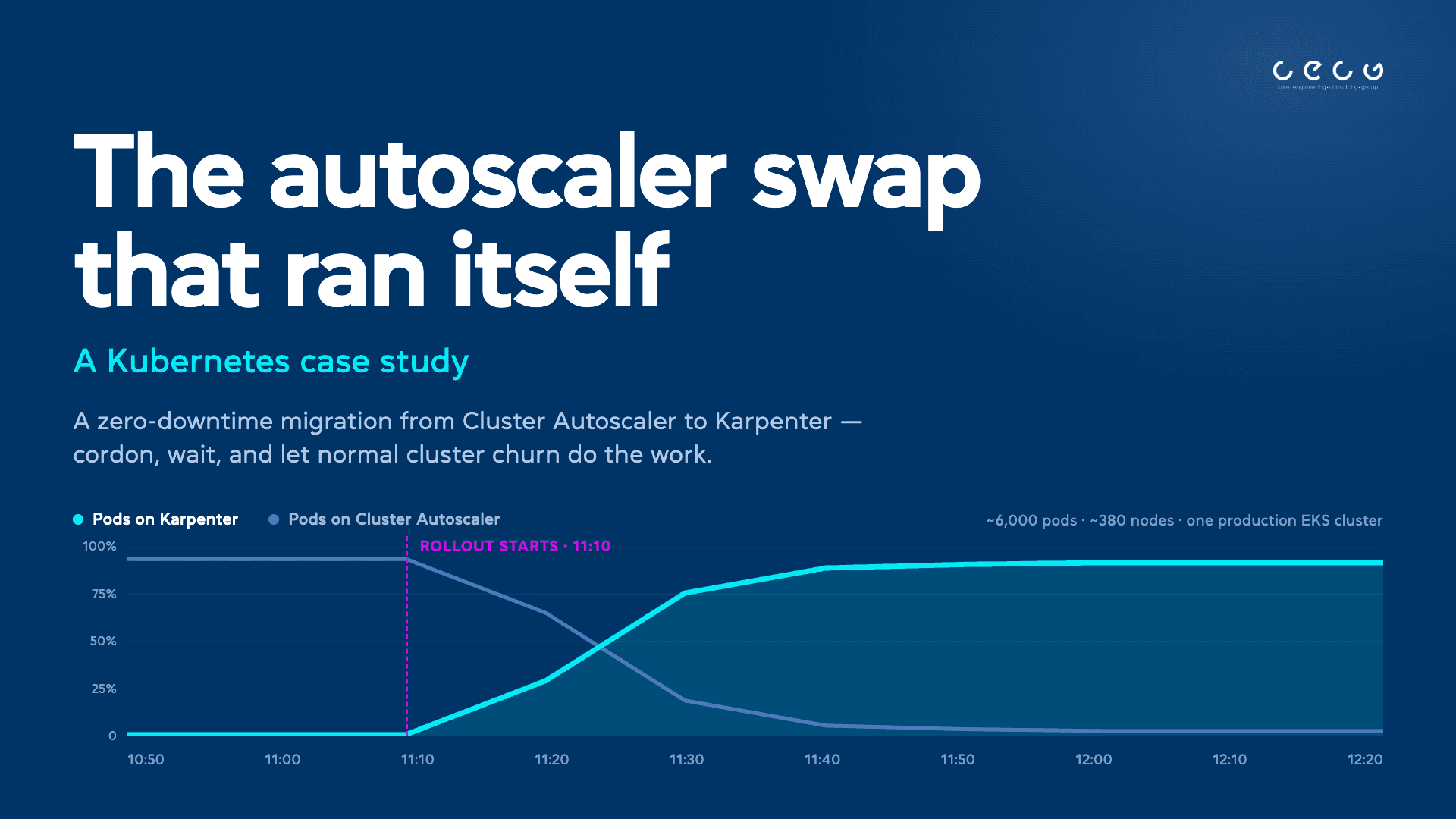
| Time (UTC) | CAS Nodes | Karpenter Nodes | Pods on CAS | Pods on Karpenter | Karpenter pod share |
|---|---|---|---|---|---|
| 10:50 | 340 | 2 | 5,456 | 35 | 1% |
| 11:00 | 368 | 2 | 6,202 | 35 | 1% |
| 11:10 (rollout start) | 371 | 7 | 5,470 | 54 | 1% |
| 11:20 | 348 | 104 | 4,030 | 1,829 | 31% |
| 11:30 | 293 | 270 | 1,224 | 4,897 | 80% |
| 11:40 | 161 | 334 | 341 | 5,838 | 94% |
| 11:50 | 113 | 347 | 247 | 5,817 | 96% |
| 12:00 | 79 | 348 | 184 | 5,877 | 97% |
| 12:10 | 66 | 337 | 176 | 5,689 | 97% |
| 12:20 | 64 | 330 | 174 | 5,533 | 97% |
workloadRestartDelayHours parameter (default: 8 hours) controls when the CronJob starts actively restarting that long tail. It gives long-running Jobs time to finish naturally before any forced restarts begin.Lessons Learned
-
It is faster than expected. Natural churn does most of the work. Deployments, CronJobs, scaling events, and CAS draining underutilised nodes — all of this is already happening in any active cluster. Cordoning simply redirects it to Karpenter. The forced restart mechanism is only needed for the long tail.
-
One restart at a time contains failure. The CronJob selects one eligible controller per run, then waits for its rollout and application-health gates. Because PDBs do not govern controller-driven restarts, we enforce availability through update strategy, replica count, workload-specific safeguards, and health gates. Singleton and other unsupported workloads stay outside the unattended path. We did not experience a capacity incident or application downtime during these migrations.
-
Cap CAS; do not disable it. During rollout, CAS is still running under a global node ceiling. It can preserve a rollback path and may scale its existing ASGs while below that ceiling, so the chosen value must retain the capacity needed for system workloads and handback.
-
Label what is cordoned. The migration label (
example.com/cordoned-by=karpenter-migration) is what makes rollback safe. Without it, the rollback script would uncordon nodes that were cordoned for maintenance or by other automation. -
Keep the Descheduler. After migration completes, Karpenter consolidates underutilised nodes. The Descheduler helps rebalance pods that end up unevenly distributed after consolidation events.
Adapting This for Your Environment
- A mode flag in your cluster config that controls NodePool limits, CAS settings, and CronJob deployment
- Two shell scripts — rollout (cordon + delayed restart) and rollback (uncordon + delete NodeClaims)
- A serialized CronJob with
concurrencyPolicy: Forbid, a Lease, fail-closed health gates, and RBAC to read/patch nodes, read Karpenter CRDs, and restart allowlisted workloads - A tracking label on cordoned nodes to distinguish migration cordons from manual ones
Conclusion
This article is provided as a general guide for general information purposes only. It does not constitute advice. CECG disclaims liability for actions taken based on the materials.
Turn Zero-Downtime Migration from Cluster Autoscaler to Karpenter Into A Strategic Advantage
Continue Reading
Discover more insights from our blog collection

Imagine acquiring sought-after engineering skills that could significantly boost your expertise and confidence, in a matter of weeks.
Learn about Crossplane's deletion policies and how improper handling can lead to orphaned cloud assets. This guide covers Kubernetes Admission Protection, Crossplane Delete Policies, Usages for Dependency Ordering, and more to help you manage your infrastructure safely.
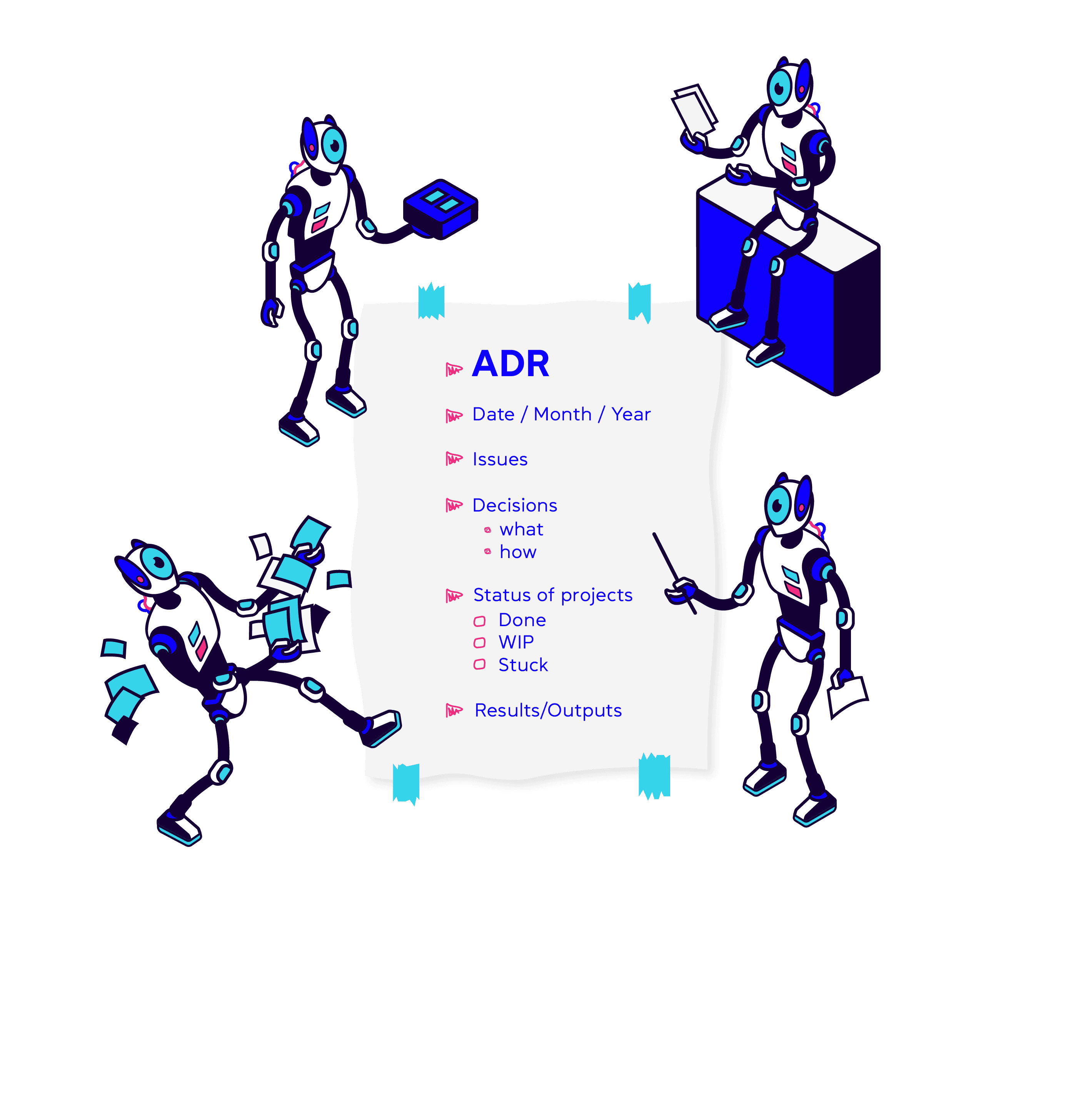
Learn why we use ADRs and how they can help your team.

Want To Talk This Through?
Planning a CAS to Karpenter Migration on Production Clusters? We Can Help You Design a Safe, Hands-off Rollout.